
DaVita Machine & Water Labs (BART)
Integrated external solutions to improve machine management efficiency
Role: Lead Product Designer
Date: 2022
The Problem
Dialysis machines require regular lab testing to ensure safety and proper operation — a critical process across all DaVita clinics.
The existing Machine & Water Labs (MWL) system lived on unsupported external servers and operated separately from BART, DaVita’s internal machine management platform. This created fragmentation, inefficiencies, and reliance on outdated infrastructure.
The business goal was to replace the legacy system and integrate lab ordering directly into BART, creating a unified and maintainable internal solution.
Why this was challenging
Integration of external functionality into an existing internal platform
Highly specialized workflow with only two primary admin users
Need to balance visibility of complex machine data without overwhelming the interface
Legacy system constraints with existing mental models
High dependency on stakeholder input and expectations
Ideate
This idea generation process began with determining that our touchpoint was a desktop application that would integrated directly into the pre-existing internal application.
From the sketch that our stakeholder provided us it was clear that the main focus of the application would be to track the various lab orders, or “requisitions” that would be ordered for a dialysis machine. Each machine would be treated as an entry in the table and could have one or more lab orders ordered for it at any time. It was important to show a wide swath of metrics associated with the machine such as the clinic location, serial number, manufacturer, etc...
Research & Key Insights
Due to the small user group, discovery was conducted through working sessions with a primary administrator.
Key findings:
The core workflow centered around managing lab requisitions per machine
Each machine could have multiple concurrent test orders
Users needed visibility into detailed machine attributes (location, serial number, manufacturer)
The biggest risk was introducing complexity into an already dense system
A stakeholder-provided sketch helped define expectations early
Existing Workflow
Lab orders were managed through a disconnected, external system
No integration with BART, requiring context switching
Limited visibility into machine-specific testing data within a single interface
Approach
The goal was to embed lab management directly into BART without disrupting existing workflows.
Key design decisions:
Use a table-based structure to represent machines as primary entities
Allow multiple lab requisitions per machine
Surface key machine attributes directly within the interface
Maintain consistency with BART’s existing patterns and design system
The primary challenge was introducing new functionality while preserving usability in a data-dense environment.
Solution
We designed an integrated lab management experience within BART that centralized machine testing workflows.
The system:
Enabled creation and management of lab requisitions per machine
Displayed key machine data alongside testing activity
Reduced reliance on external systems
Consolidated workflows into a single interface
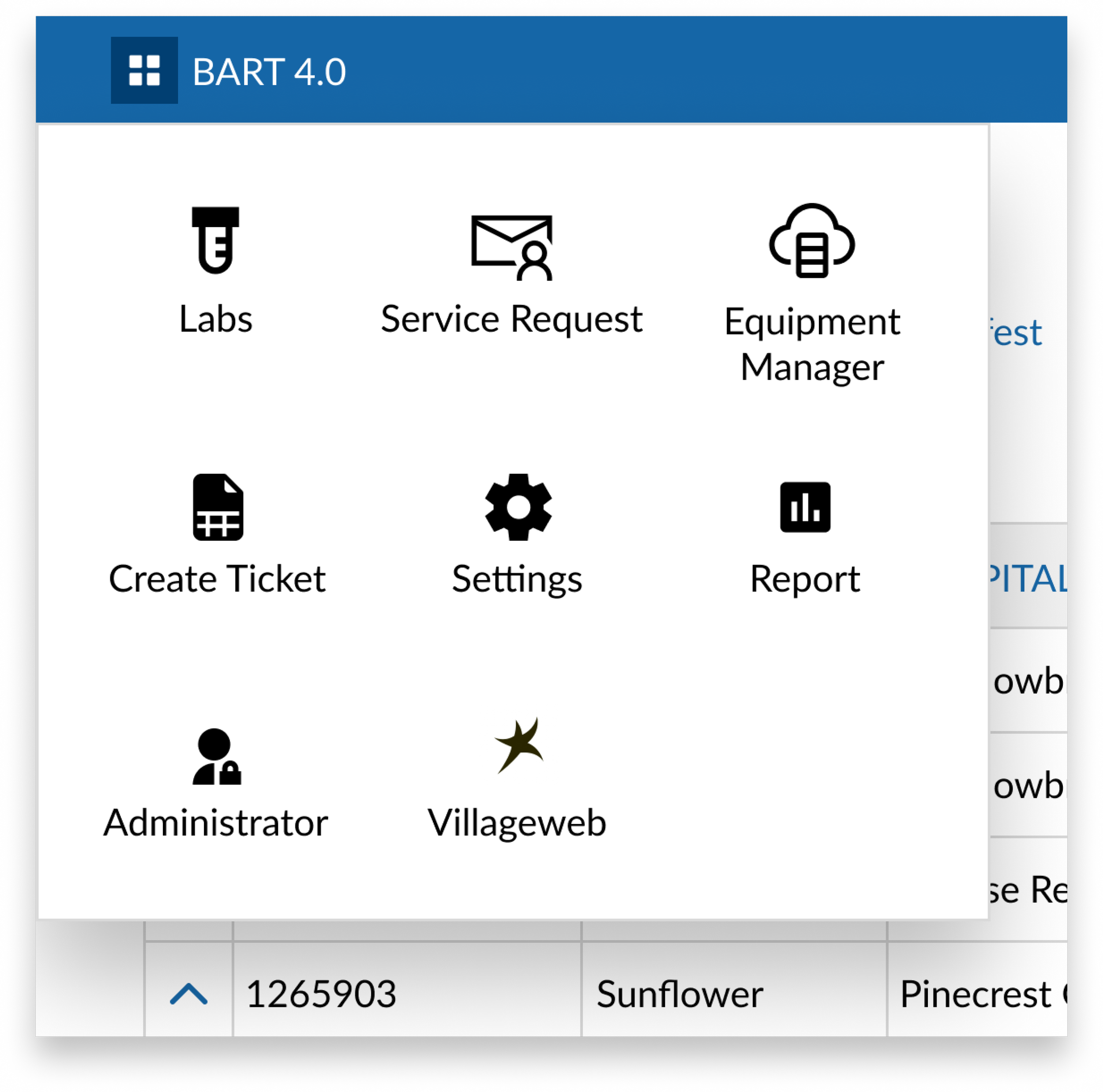
Menu Integration
Integrate the “Labs” section into the current BART application alongside all of the current facets of the application. Easily accessible through the top left dropdown navigation.
Lab Requests Dashboard
Each lab request/requisition generated in the system with facility/hospital and machine data.
Action including creating a new request/requisition, confirming and or printing a label to send samples off to the lab.
Horizontal sub-menu giving access to other features in the sub-application.
Expandable section within each request/requisition showing each associated test code.
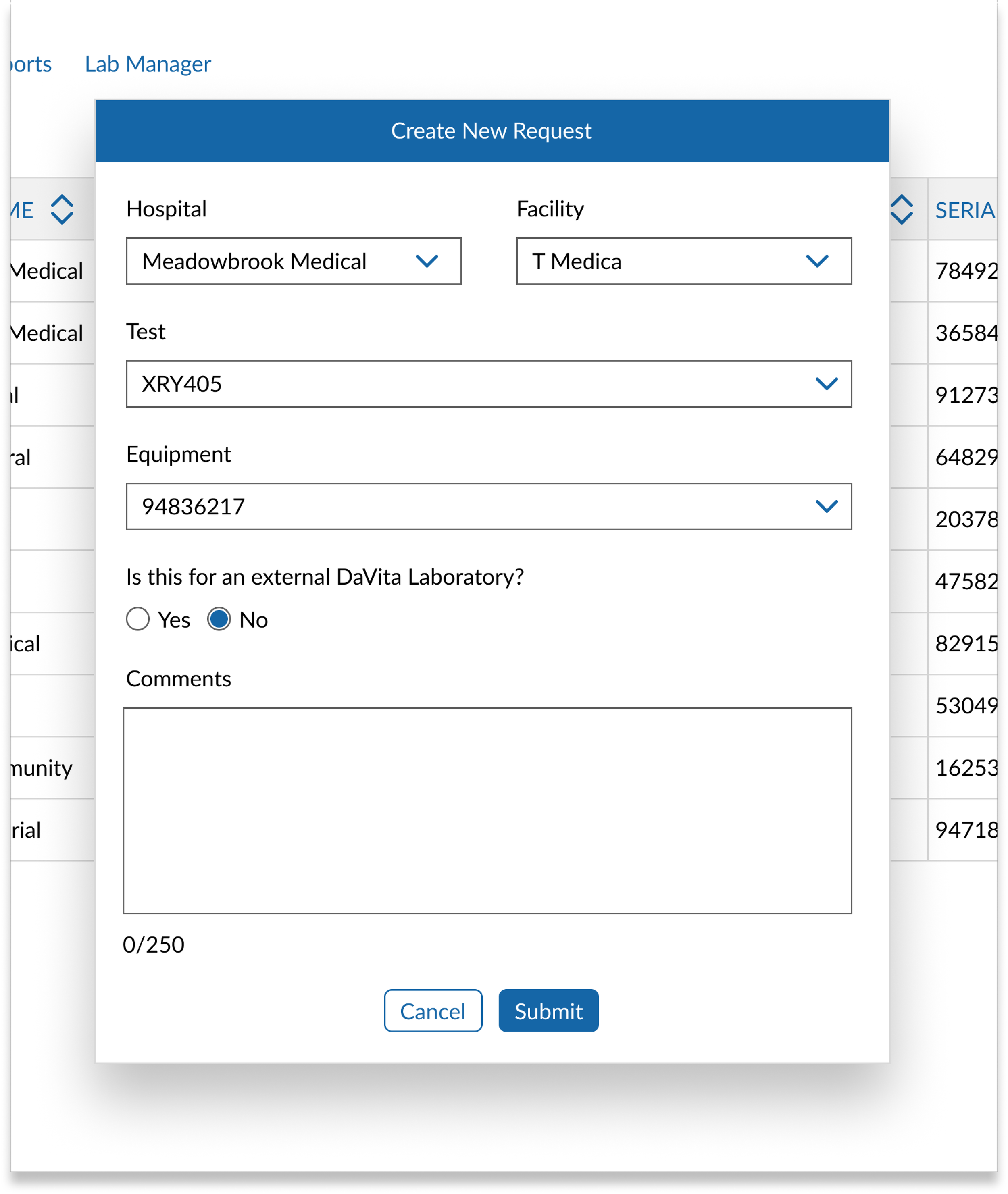
Create New Lab Order
From the “Create New” primary button to the far right of the request/requisition table the user can order a new lab request.
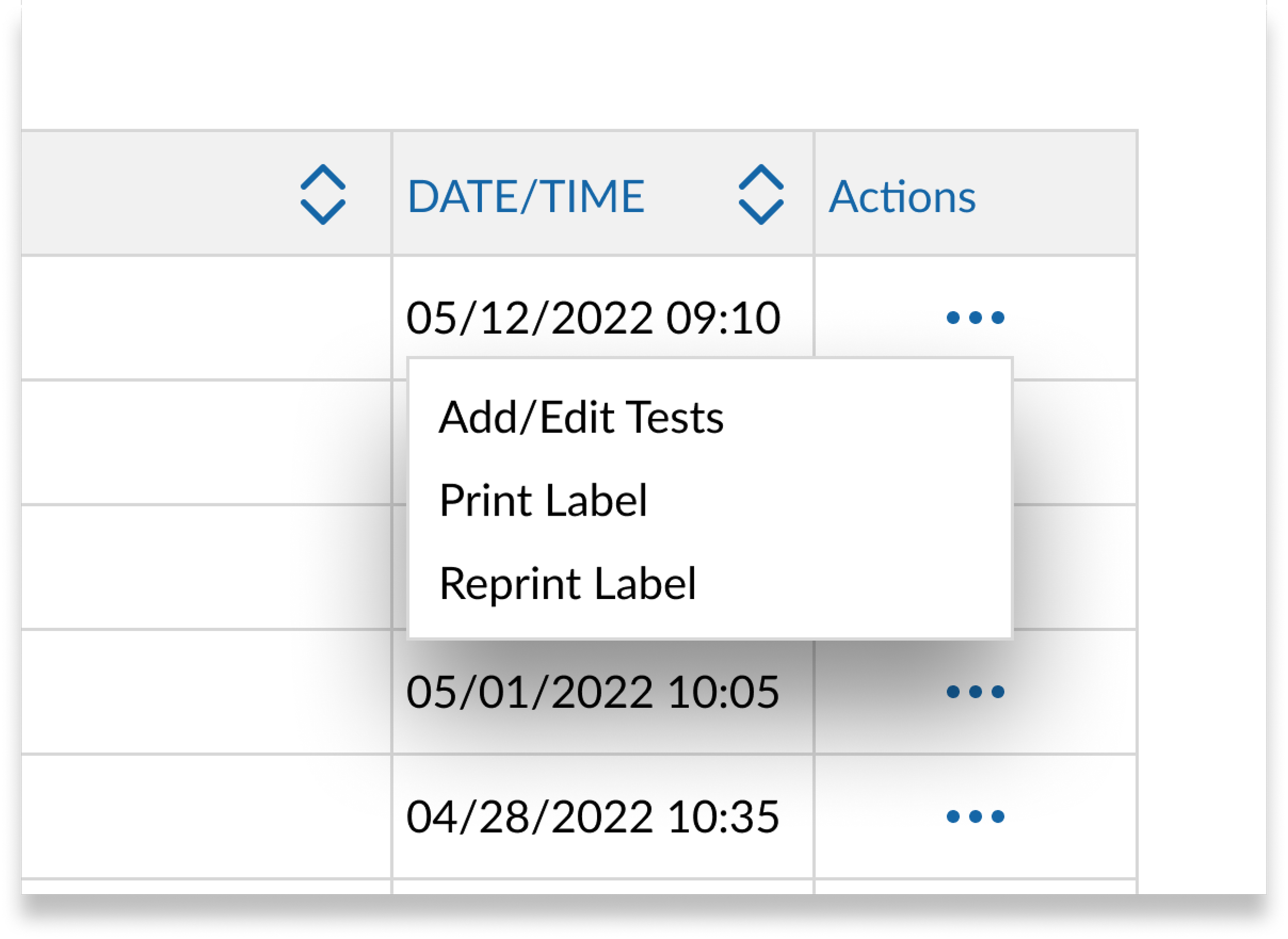
Shipping Manifest
Once the lab order is created, and confirmed by the administrator that all tests have been added properly it is then sent to the shipping manifest for final review.
From the actions menu the user can Add/Edit and tests associated print, or reprint a label and the order is sent to any internal or external lab.
Lab Manager Dashboard
At any time the administrator can manage any lab tests directly associated with any machines.
They also have the ability to add any new tests and tie those directly with a machine that simplifies the create lab order process.
Testing & Iteration
Initial user acceptance testing revealed a critical issue:
The solution met one stakeholder’s expectations but failed for the second primary user.
This highlighted gaps in workflow efficiency and visibility.
Key Improvements:
Inline visibility of lab tests: Added dropdowns within table rows to eliminate unnecessary navigation
Action dashboard: Introduced a centralized view of incomplete or blocked lab orders
Shipping manifest: Enabled editing, managing, and reprinting labels for lab shipments
These changes reduced friction and aligned the system more closely with real-world usage.
Outcome
The redesigned system replaced a disconnected, legacy workflow with an integrated solution inside BART.
Results:
Centralized lab ordering and management for dialysis machines
Improved visibility into machine data and testing activity
Reduced reliance on unsupported external systems
Increased efficiency for a highly specialized admin workflow